

The white-label search is the World of Regions travel-requirements tool, running on our infrastructure and wearing your brand. A traveller picks their passport and their destination and gets the same answer the public site gives — entry status, documents, validity, vaccinations — without leaving your website.
You embed a page rather than call an API, so there is no front end to build and nothing to keep in step when the underlying data changes. What you configure is the language it opens in and the palette it draws itself with.
- Delivery
- embedded page
- Auth
- API key + domain
- Plans
- standard · premium · enterprise
- Billed
- monthly + per visit
Embedding the search
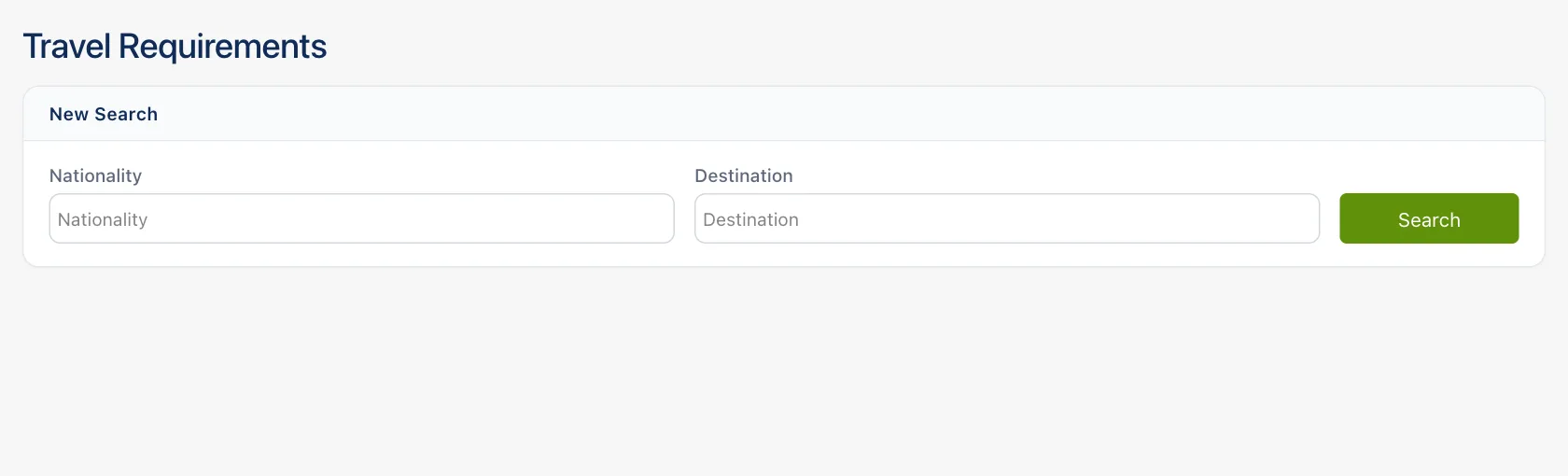
What the embed is
The travel-requirements search is a complete page you load in an <iframe> on your own site. A
visitor picks one or more nationalities and one or more destinations, and the embed answers every
combination of the two: one card per pair, headed with the pair's own name. Direction is not
symmetric — a Polish passport entering Spain and a Spanish passport entering Poland are two
different records, so POL → ESP and ESP → POL are two different cards.
Each card offers the same answer two ways. Written is the default: the verdict, the authored explanation, what to do before you travel, and the full reference table folded away underneath. Structured is that table on its own, for someone scanning values rather than reading. Both readings end on the same disclaimer, because requirements move and the border officer decides.
Two outcomes are worth telling apart in testing. "We have nothing recorded for this pair yet" is an answer, and asking again will not change it; "We could not load this route just now" is a transport failure, and the Search button will retry it. If your organisation's prepaid balance runs out, a Payment required banner appears above the search.
The embedded page is served noindex on purpose. It is your page that should be indexed for this
content, not ours.
Getting a key and authorising your domains
Keys are created in the World of Regions admin panel, under API.
- Open the API keys section and create a key. Copy its value from the card — it is the
tokenyou will put in the embed URL. - Fill in Allowed domains, up to five, one per row (
example.com,app.example.com). Leave every row empty and the key is accepted from any origin; the panel warns you about this, and it is not a setting to ship. You can edit an existing key's domains at any time. - Open the White label section and create a configuration: a type (Standard, Premium or Enterprise) and a style preset (Default, Minimal, Dark or Light), together with the token it belongs to — paste a key you already hold, or let the panel mint one for you.
The token travels in the URL you write into your page, so anyone reading your page source can see it. Domain authorisation is what stops it being useful anywhere else; set it before you go live.
The URL you embed
https://world-of-regions.com/API/{language}/Elektroniczne-systemy-sprzedazy/{configuration}
{language} is en, pl or es. It sets the interface language and the language the country
names and the written answer come back in. An unrecognised code falls back to English.
{configuration} is a single JSON object, read in either of two forms: raw JSON, or that same JSON
base64-encoded. Both are supported and both will keep working, so use whichever your build
produces. Either way it is one path segment, so percent-encode it — encodeURIComponent in
JavaScript. Base64 output can contain a /, which would otherwise split the path, and raw JSON
contains braces and quotation marks. Anything the embed cannot decode is treated as an empty
configuration: a panel with no token and no answers.
{
  "token": "your-api-key",
  "initialNationality": ["POL"],
  "isAutoSearchOnChange": true,
  "prettyMode": true
}
<iframe
  src="https://world-of-regions.com/API/en/Elektroniczne-systemy-sprzedazy/eyJ0b2tlbiI6InlvdXItYXBpLWtleSJ9"
  title="Travel requirements"
  width="100%"
  height="900"
  loading="lazy"
  style="border: 0"
></iframe>
What you can configure
Every field is optional except the token, and anything you leave out keeps its default.
| Field | Type | What it does |
|---|---|---|
token |
string | Your API key. Sent with every call the embed makes; without it nothing loads. |
initialNationality |
string[] | Nationalities selected when the panel opens, as ISO 3166-1 alpha-3 codes (POL, ESP). |
destinationCountry |
string[] | Destinations selected when the panel opens, same code form. |
disableChangeDestination |
boolean | Locks the destination picker, so the visitor can only change the nationality. |
isAutoSearchOnChange |
boolean | Removes the Search button and searches whenever both fields hold a value — including the values you preselected. |
prettyMode |
boolean | A stripped panel: the two fields are held to 450px and pushed to the outside edges, and the Written / Structured switch is hidden. |
disableTitle |
boolean | Hides the "Travel Requirements" heading and the "New Search" band above the fields. |
palette |
object | Your own colours. See below. |
The nationality field only offers nationalities we hold records for, so a code outside that list will not appear as a tag even if you preselect it. Destinations are picked from a continent-grouped list with a search box over it.
Matching your own styling
Ship a palette and the embed paints itself in your colours. Each key becomes a CSS custom
property on the page — cardSurface becomes --wor-card-surface, buttonHoverBackgroundColor
becomes --wor-button-hover-background-color — and nothing in the embed's own stylesheet carries a
hard-coded colour, so every surface, rule and label follows. Values are whatever CSS accepts.
Send only the keys you have an opinion about. They are layered over the embed's defaults, so a palette carrying three colours is a valid palette.
| Group | Keys |
|---|---|
| Ground and ink | pageBackgroundColor (the ground the cards sit on), backgroundColor (a surface), color (the ink) |
| Fields | fieldFill, fieldFillHover, fieldBorder, inputBorderColor, focusedInputBorderColor, placeholderColor, optionHoverColor |
| Buttons | buttonBackgroundColor, buttonBorderColor, buttonTextColor, buttonHoverBackgroundColor, buttonHoverTextColor |
| Chips | tagFill, tagLine, tagRadius |
| Answer cards | cardSurface, cardBand, cardLine, cardLineSoft, cardLineStrong, cardMuted, cardMutedStrong |
| Accents | brdExclusiveColor (links, the prose lead, the open FAQ question), segmentedTrackColor (the Written / Structured track), separatorColor, borderColor |
One key is a boolean rather than a colour: isDark. Set it and you have told the embed outright
whether its ground is dark; leave it out and it reads the luma of the ground you set and decides
for itself.
The verdict colours — the visa-required red, the visa-free green, the eVisa blue — are deliberately not in the list above. They follow the light or dark base your ground selects, so they stay legible against it. You can pin one by naming it in the palette, but you are unlikely to need to.
How it behaves in the frame
The embed pads itself and sizes itself to whatever width you give it. Below 800px the two fields and the Search button stop sitting in a row and stack full width; below 520px the Written / Structured switch drops onto its own line rather than crowding the pair name; the continent grid in the destination picker folds from four columns to three, then two, then one as the frame narrows. On a phone that picker opens as a full-height drawer instead of a dropdown, so it is usable in a narrow frame.
What the embed does not do is resize its frame: it sends no height message to the host page. Give
the <iframe> a height generous enough for an answer — the cards are tall, and a visitor who
searches several pairs at once gets one card each — and leave the frame's own scrolling on.